Creating a convincing studio-style AI portrait is less about adding extreme detail words and more about controlling how the model interprets structure, lighting, and identity preservation. Many creators overload prompts with cinematic keywords hoping the render will automatically become professional. In practice, that usually causes unstable textures, inconsistent faces, and exaggerated contrast. The prompt here works better because it separates technical direction from stylistic control in a relatively disciplined way.
One of the strongest decisions inside this prompt is the use of camera language. Mentioning a 50mm f/1.8 lens simulation immediately influences how the AI handles facial proportions and background compression. Wider virtual lenses often stretch facial geometry slightly, especially around jawlines and shoulders, while longer focal lengths can flatten depth too aggressively. A simulated 50mm setup tends to preserve realistic portrait proportions without introducing noticeable distortion.
Why Camera Language Changes the Entire Output
The centered medium framing also affects generation stability more than many people realize. AI image models generally behave more consistently when the face remains near the center of the composition. Extreme side framing increases the chance of asymmetrical shoulders, distorted hands, or uneven lighting. Keeping the subject centered helps the model prioritize facial structure and body alignment before processing secondary visual elements like suits, watches, or shadow effects.
Lighting instructions are another reason this prompt performs more reliably than generic portrait prompts. Instead of vaguely asking for dramatic lighting, the prompt specifically references Rembrandt-style lighting with soft front fill. That combination gives the AI a clear understanding of shadow direction while preventing facial features from disappearing into darkness. Models usually respond better to named lighting structures because they are heavily represented in photography training datasets.
Facial Identity Preservation Requires Multiple Reinforcement Signals
Identity preservation is where many AI portraits begin falling apart, especially when formal clothing and dark backgrounds are introduced. Black suits often confuse image generators because the system struggles to separate clothing contours from the surrounding environment. By explicitly requesting preserved facial identity, original hairstyle retention, and unaltered facial structure, the prompt creates multiple reinforcement anchors that reduce identity drift during generation.
Another important detail is the instruction to avoid grain, vintage effects, and noise. AI systems frequently inject artificial texture when users ask for realism or cinematic aesthetics. Removing those elements directly inside the prompt helps maintain cleaner skin rendering and smoother gradients across black backgrounds. Without that instruction, many models introduce unnecessary film grain that weakens professional studio realism.
Prompt Structure Matters More Than Prompt Length
A common mistake in AI portrait generation is stacking too many stylistic terms together without hierarchy. When prompts contain excessive adjectives, the model begins blending conflicting visual interpretations. This prompt works because it organizes information logically. Camera setup comes first, followed by subject positioning, lighting direction, clothing design, facial preservation, and final rendering instructions.
That sequence matters. AI systems process prompts in weighted patterns rather than strict sentence-by-sentence understanding. Early instructions often receive stronger attention during generation. Placing camera behavior and framing near the beginning helps stabilize the composition before artistic details are introduced later in the prompt.
Black Backgrounds Are Harder for AI Than They Look
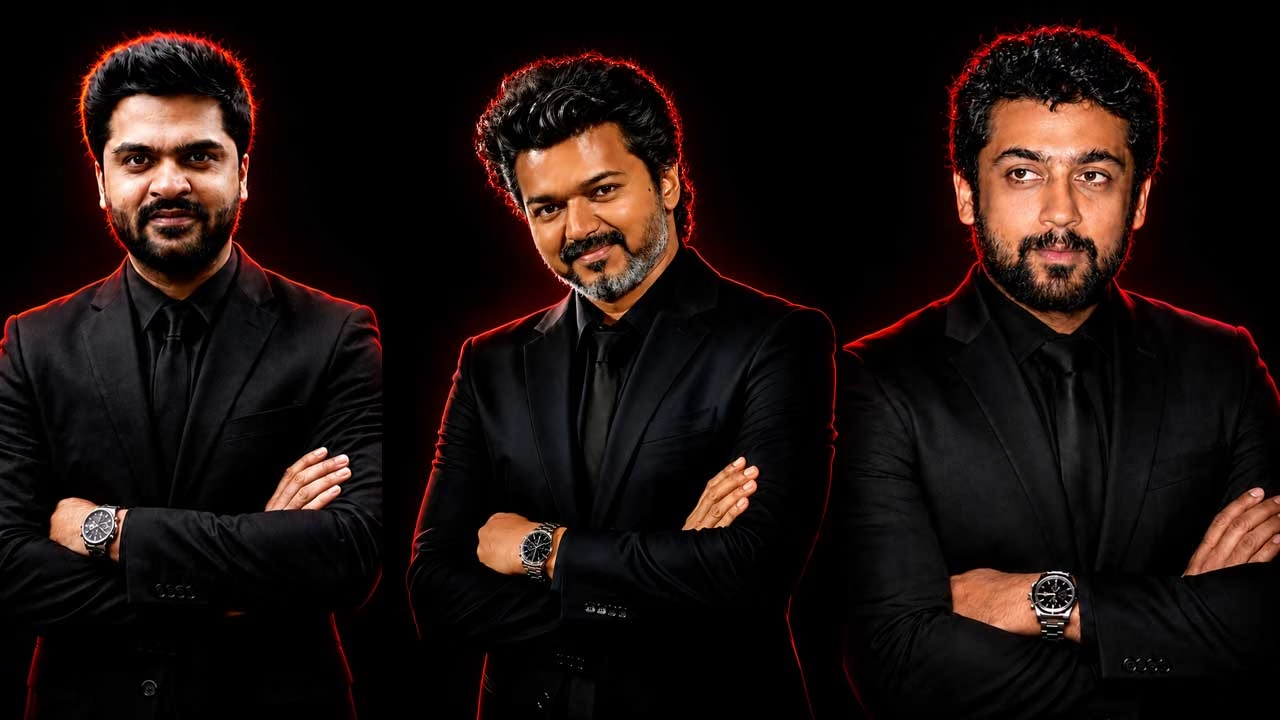
Solid black backgrounds seem simple, but they are surprisingly difficult for AI models to handle correctly. Pure dark environments often cause shoulder blending, edge tearing, or inconsistent suit textures. The subtle red outline shadow effect included in the prompt solves part of this problem by creating visual separation between the subject and the background.
In testing, weaker AI models occasionally exaggerated the red glow and transformed it into neon lighting. Reducing prompt emphasis on the outline effect usually restores realism. The best results come when the shadow remains soft and restrained rather than acting like a graphic design element pasted behind the subject.
Lighting Quality Controls Facial Realism
Many users assume facial consistency only depends on face reference quality. In reality, lighting, pose direction, and skin texture instructions also influence identity preservation heavily. If the lighting becomes too harsh or shadows cover one side of the face aggressively, the AI may reinterpret facial structure entirely.
That is why softer front-fill lighting is important here. It preserves visibility across both sides of the face while still maintaining dramatic depth. Hair preservation instructions also help stabilize identity because hairstyles act as secondary recognition markers inside most AI generation systems.
Why the 9:16 Aspect Ratio Improves Studio Portraits
The 9:16 aspect ratio is not simply a social media preference. It changes how AI models distribute visual weight across the frame. Vertical compositions force the generator to emphasize posture, shoulders, and upper-body balance rather than focusing only on close facial crops.
For studio portraits, this aspect ratio works especially well because formal clothing becomes part of the composition instead of appearing partially cropped. However, some AI models struggle with lower-body continuity in taller formats. Extending the prompt with terms like “balanced body proportions” or “centered upper-body framing” can improve structural consistency.
Negative Prompts Quietly Improve Professional Realism
Negative prompts are often underestimated in portrait workflows. While the main prompt controls what the AI should generate, negative prompts reduce unwanted rendering behaviors that commonly appear in portrait models.
For this type of studio portrait, useful negative prompts usually include terms related to extra fingers, distorted hands, asymmetrical eyes, oversharpened skin, exaggerated glow, blurry suit texture, cartoon shading, low-detail hair, warped shoulders, duplicate accessories, and artificial skin smoothing. These restrictions help the model maintain cleaner realism without constantly correcting issues manually afterward.
Different AI Models Interpret Realism Very Differently
Not all AI tools respond to realism prompts the same way. Some models prioritize photographic sharpness while others lean toward beauty-retouched illustration styles even when realism is requested. Stable Diffusion-based systems usually provide stronger prompt control but may require additional refinement through negative prompts and CFG adjustments.
Midjourney-style generators often produce more visually polished outputs immediately, but they can sometimes soften identity accuracy in exchange for aesthetics. Flux-style models tend to preserve facial structure more consistently but may need additional texture control for clothing realism. Understanding these behavioral differences matters more than blindly copying prompts between platforms.
Texture Quality Depends on Controlled Detail Distribution
Many creators accidentally ruin realism by forcing ultra-detail across every element equally. Real studio photography naturally contains areas of softness, especially in background transitions and fabric folds. This prompt avoids that problem because it balances sharp facial rendering with softer environmental focus.
The silver chronograph watch is a good example of where AI systems can struggle. Smaller metallic objects often become distorted under dramatic lighting. If the watch begins melting into the sleeve or losing shape, lowering accessory emphasis usually improves overall image stability.
The Prompt
Hyper-realistic studio portrait, 256K cinematic aesthetic. Medium framing, camera at eye level, with a 50mm f/1.8 lens simulation and soft background bokeh. Centered subject with a serious expression, arms crossed and supported. Strong jawline, defined shoulders, warm medium skin tone, and hair preserved in its original color, length, and style. Dramatic Rembrandt-style lighting with a soft front fill against a solid black background. No noise, grain, or vintage effects. The subject is dressed in a full black formal suit with a black shirt and tie, wearing a silver chronograph wristwatch. Elegant, minimalist, and professional atmosphere. Subject’s facial identity must be 100% preserved with completely unaltered facial features. Use the exact face from the uploaded image. Add a subtle red outline shadow effect around the subject. Output in 9:16 aspect ratio with ultra-HD 8K quality.