
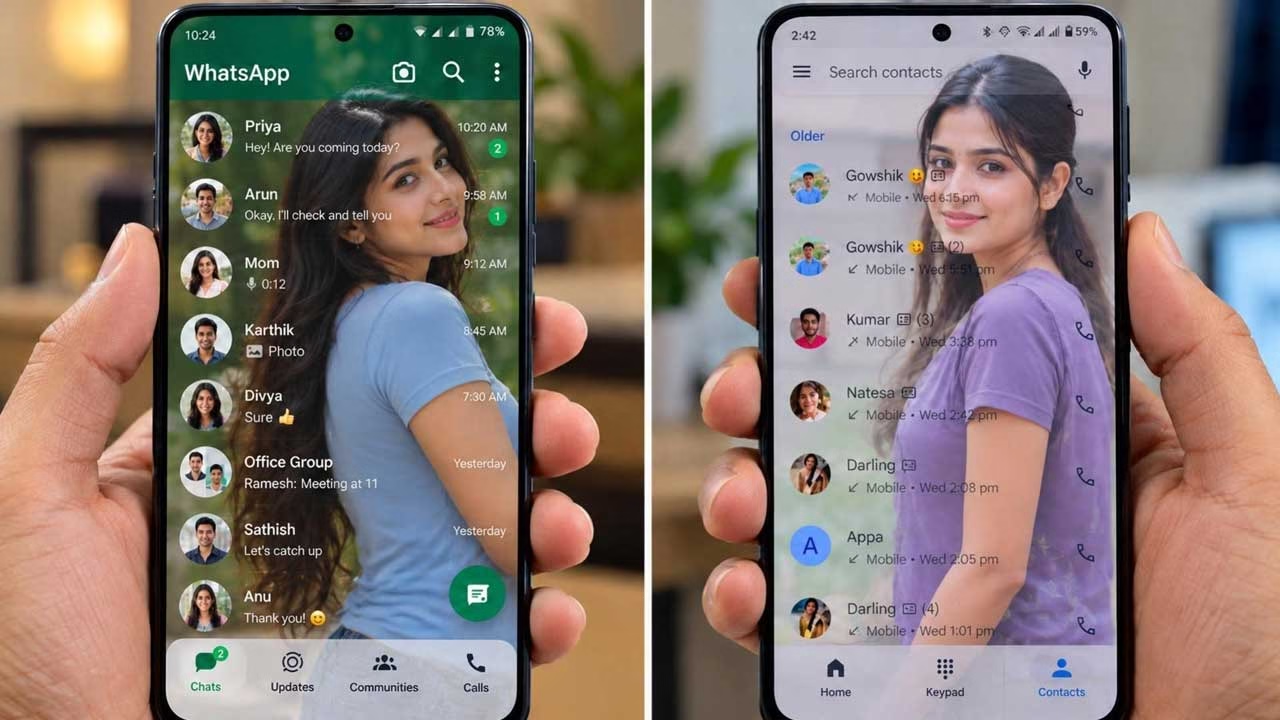
A tiny alignment problem can make an otherwise polished mobile interface feel unfinished. A button may sit slightly lower than expected, two elements may have inconsistent spacing, or a chosen color may look different from the original design. These details can be difficult to judge simply by looking at the screen. Designer Tools Pro takes a more practical approach by providing tools that help users examine an Android interface while it is actually running.
What Designer Tools Pro Actually Does
Designer Tools Pro is designed more for inspecting and validating app interfaces than for creating complete designs. Its tools can be placed over an existing Android interface, allowing users to compare what appears on the device with a design reference. This makes it particularly relevant to developers and UI designers who need to check the visual accuracy of an implementation.
Using a Grid to Examine Screen Spacing
One of the useful features is the Grid Overlay. A grid can be displayed over another application, making it easier to notice spacing, alignment and positioning differences. The grid can be customized, including its size and line appearance. This can be helpful when an interface looks almost correct but needs a more precise visual inspection.
Comparing a Finished Screen With a Design
The Mockup Overlay provides another way to examine an interface. A reference image can be placed over the running application and its transparency adjusted. Users can also change its vertical position and work with portrait or landscape layouts. This allows differences between the intended design and the implemented screen to become much easier to spot.
Finding an Exact Color
Color matching is another area where visual judgment can sometimes be unreliable. Designer Tools Pro includes a color picker with a magnifying loupe that allows users to inspect colors at the pixel level. The hexadecimal value can then be copied, which is useful when a developer needs the precise color used in a particular part of an interface.
Useful During App Development
The app can be especially useful during the stage when a design has already been approved and is being converted into a working Android application. A designer can provide the reference, while the developer can inspect the finished screen against it. Instead of explaining that something looks slightly different, the team can identify the exact area that needs adjustment.
It Is Not a Full Design Application
Designer Tools Pro should not be confused with a complete UI design platform. It is not intended to replace software used to create complex layouts, illustrations or full application prototypes. Its strength is in checking an existing interface. In that sense, it works more like an inspection utility that complements the main design and development tools.
Working With Different Screen Elements
The overlay approach also makes it possible to examine how visual elements behave within a real application. A designer can check whether an image, layout or interface component occupies the same position as it does in the reference design. This is particularly useful when small differences become noticeable only after the design has been placed on an actual smartphone display.
Who Can Make Use of It?
The same features can serve different purposes depending on the user. UI designers can use the grid and mockup functions to examine spacing and positioning. Android developers can compare their implementation with a design reference, while testers can use the tools to identify visual inconsistencies before an application is released.
Understanding the Required Permissions
Since some of its functions work above other applications, users should pay attention to the permissions requested by the app. The developer describes the AccessibilityService API as being used to provide its floating popup and multitasking functionality. Users should always review Android permission requests and understand what they enable before granting them.
Android Compatibility
Another factor worth considering is compatibility with newer versions of Android. Apps that rely on overlays and system-level functionality need to remain compatible as Android changes. Keeping the utility updated can therefore be important for developers who use it as part of their regular testing workflow.
Download App
Where Designer Tools Pro Fits Into the Workflow
The main value of Designer Tools Pro comes from its focus on verification rather than creation. Designing an interface is only the beginning; reproducing its spacing, colors and proportions accurately on a physical device is another challenge. By bringing grid overlays, mockup comparison and color inspection into the device-testing process, the app provides a practical way to examine those details before the final application reaches users.