Creating cinematic AI portraits that look believable is no longer just about typing a few descriptive words into a generator. Modern image models react heavily to structure, keyword placement, lighting logic, camera language, and subject hierarchy. A prompt may contain the same visual idea, but depending on how the information is ordered, the final render can look either like a polished film still or a broken synthetic collage. The difference usually comes from understanding how image models prioritize details internally.
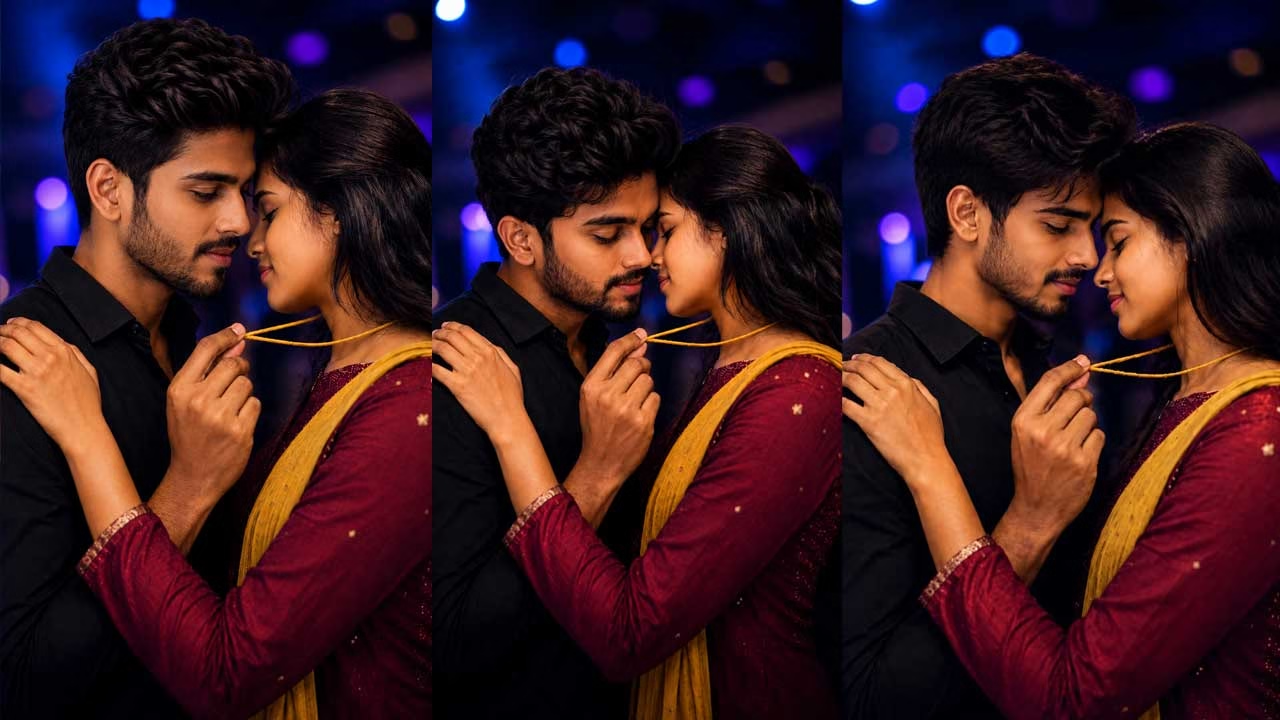
One of the biggest strengths of the prompt used here is clarity of focus. Instead of treating the couple equally, the prompt establishes a very specific visual priority: the yellow Manjal Kayiru thread. That single decision changes how the AI distributes detail across the frame. Models tend to sharpen whatever is described as the “absolute sharp focal point,” while secondary elements receive softer rendering. Without that instruction, the generator may focus on the faces instead, leaving the thread blurry or visually unimportant.
Another important detail is how the prompt mixes cinematic language with technical rendering control. Terms like “photorealistic,” “cinematic close-up,” and “Ultra-Cine 8K finish” guide the model toward film-style rendering instead of painterly outputs. However, these terms alone are not enough. The real control comes from combining scene direction with body positioning. Specifying that the man’s right index finger gently lifts the thread gives the AI a precise anatomical action to follow. When prompts become physically descriptive, hand placement and pose accuracy improve noticeably.
Lighting control is another area where experienced prompt writing matters. Many people simply type “cinematic lighting,” but that rarely guarantees realistic depth. In this prompt, the nightclub background, soft blue and purple ambient lighting, and bokeh effects work together as a complete environment description. AI models understand lighting better when the source, color, and mood are connected logically. Blue and purple ambient tones naturally suggest low-light nightlife conditions, which helps the generator create believable skin reflections, soft shadow falloff, and realistic depth separation.
Facial consistency is often the hardest part of AI portrait generation, especially with intimate close-up compositions. The prompt handles this using identity-focused instructions like “FaceID100” and “exact hairstyle match.” These terms are commonly interpreted by many community-trained models as preservation cues. Even then, models can still distort jawlines, hairlines, or eye spacing during multiple generations. A practical workflow is to first generate the composition, then run a second pass using face restoration or identity preservation tools instead of trying to perfect everything in one attempt.
Texture rendering also plays a major role in realism. AI generators frequently overprocess skin, creating plastic-looking faces with unnatural smoothness. The phrase “SkinClean NAT” helps guide the render toward cleaner skin while still preserving natural texture. Experienced creators usually avoid extreme beauty-related terms because they often remove pores, soften facial structure, and create unrealistic lighting transitions. Keeping realism intact means allowing small imperfections to remain visible, especially around hands, lips, and hair edges.
Why Prompt Structure Changes the Final Image
Most modern diffusion models read prompts in weighted chunks. The opening words usually receive stronger visual priority than later sections. That is why placing “Cinematic close-up, photorealistic” at the beginning is effective. It establishes the rendering style before the AI processes character details. If those keywords were pushed toward the end, the model might interpret the image more loosely and produce flatter compositions.
Strong prompts usually follow a layered structure. First comes the visual style, then the subject description, followed by interaction, clothing, environment, lighting, and finally rendering quality. This sequence helps the model build the scene progressively instead of randomly assembling disconnected visual fragments. When prompts jump between ideas too aggressively, AI models tend to lose spatial coherence.
Controlling Depth and Focus
The prompt intentionally uses shallow depth-of-field language through terms like “beautiful bokeh” and “sharp focal point.” This is important because AI models often try to sharpen everything equally unless guided otherwise. Real cameras do not behave that way. A cinematic portrait normally isolates the subject from the background. By emphasizing selective focus, the model creates stronger foreground-background separation.
Close-up compositions can also create proportion problems. Hands may appear oversized, shoulders may bend unnaturally, or faces may lose symmetry. Including anatomy-focused instructions like “BodyAlign” and “perfect anatomy” reduces those errors, although they do not eliminate them completely. Some models respond better when you simplify anatomy instructions rather than stacking too many corrective terms together.
Negative Prompts and Artifact Control
Even excellent prompts can produce flawed generations. Fingers merge together, necklaces disappear, or eyes become asymmetrical. Negative prompts help reduce these problems by telling the model what to avoid. For a scene like this, useful negative prompts would include:
“extra fingers, blurry thread, distorted hands, duplicate limbs, plastic skin, low contrast, broken anatomy, warped shoulders, crossed eyes, artificial hairline, floating jewelry, oversaturated lighting.”
Negative prompting works best when it targets actual generation weaknesses instead of generic quality complaints. Adding dozens of random negative keywords usually weakens image stability rather than improving it.
Choosing the Right Aspect Ratio
Aspect ratio has a surprisingly large effect on composition quality. Portrait-oriented ratios like 4:5 or 9:16 work especially well for close emotional framing because they naturally emphasize faces and hand gestures. Wider cinematic ratios can look beautiful too, but they often reduce detail density around smaller objects like jewelry or fingers.
For mobile-first social media content, vertical framing usually performs better because the AI can dedicate more pixels to facial detail. Wider frames often force the model to spend rendering power on background space instead of texture accuracy.
Differences Between AI Image Models
Different AI generators interpret prompts differently. Midjourney tends to prioritize mood, color harmony, and cinematic atmosphere automatically, sometimes at the expense of exact anatomy. Stable Diffusion-based models usually provide better control for identity consistency and custom workflows, especially when combined with LoRA models or ControlNet guidance. Flux models often produce cleaner realism and sharper lighting transitions but may require more careful prompt balancing.
Some models also react differently to cinematic keywords. One model may interpret “Ultra-Cine 8K” as extra sharpness, while another may overprocess the image with artificial HDR effects. Testing the same prompt across multiple models is often the fastest way to understand each engine’s behavior.
Improving Realism Through Iteration
Experienced AI creators rarely achieve perfect results in a single generation. The usual workflow involves generating multiple drafts, identifying recurring problems, refining prompt weights, adjusting CFG scale, and sometimes using inpainting to repair small areas like fingers, noses, or jewelry placement.
One practical strategy is separating composition from realism refinement. First generate the pose and framing correctly. After that, upscale and repair facial texture, lighting consistency, and fine details individually. Trying to solve every issue simultaneously usually leads to unstable renders.
Prompt Used
Cinematic close-up, photorealistic. A man and woman in a profound, intimate embrace, foreheads gently touching. The absolute sharp focal point is a single, thick, yellow Manjal Kayiru thread on the woman’s neck. The handsome man, with a subtle proud smile, gazes intensely at the thread. His right hand is in the foreground; his right index finger gently lifts this specific Manjal Kayiru. Woman’s eyes closed, hands on man’s left shoulder. Clothes: woman in maroon chudi, yellow shawl; man in plain black shirt. Background: blurred nightclub, soft blue/purple ambient light, beautiful bokeh. HRFX: exact hairstyle match. Keep real hairline. FaceID100: 100% identity preservation. SkinClean NAT. BodyAlign: correct shoulders/hands. NoArtifacts. Ultra-Cine 8K finish. Detail-rich, sharp focus on yellow thread, man’s right hand lifting it, intimate pose, nightclub lights, perfect anatomy.