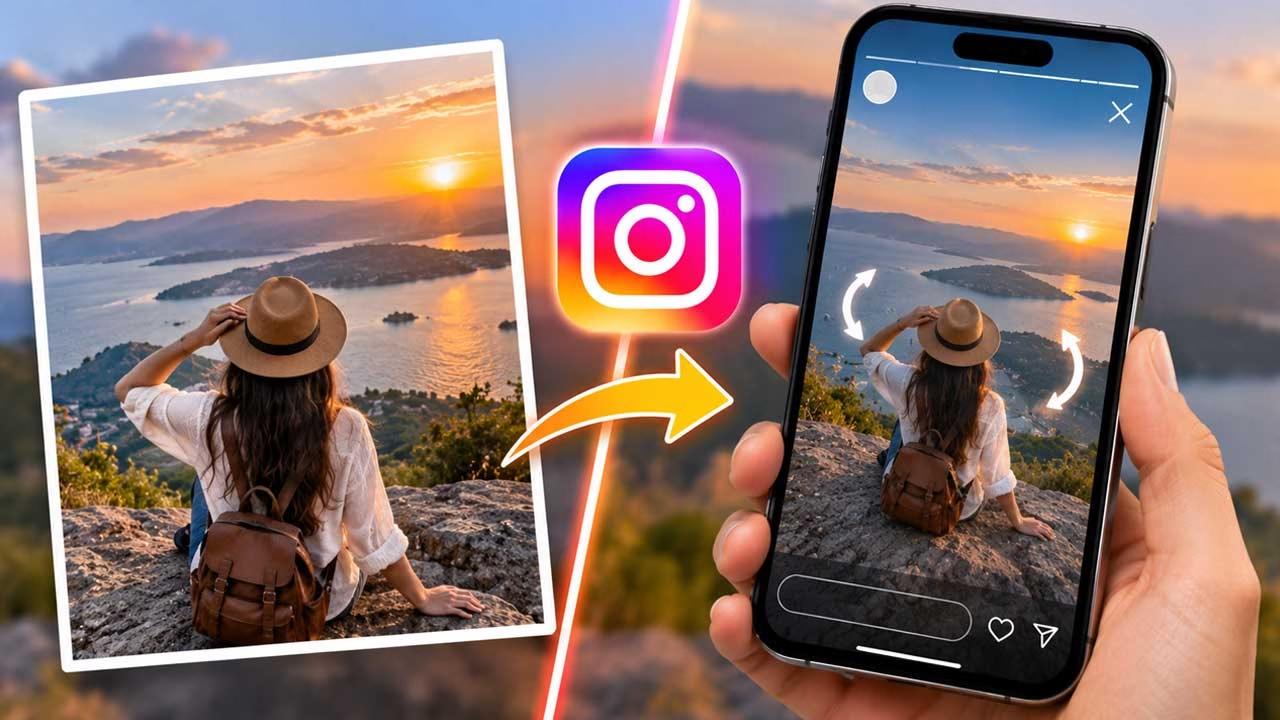
A photograph normally asks people to look at it. A rotating Instagram Story asks them to participate. That small change can make an otherwise familiar picture feel surprisingly different, particularly when the scene contains details that disappear inside a standard Story crop. Instagram introduced Spin View as a format associated with Meta’s AI-powered glasses, allowing viewers to move their phones and explore a wider perspective.
The Idea Behind the Rotating Format
Think of the effect as a movable window rather than a conventional animation. The image itself stays in place while the viewer changes the portion of the scene they are looking at. This makes the format especially interesting for photographs containing depth, surroundings, or details spread across the frame. A street photograph, room, vehicle interior, landscape, storefront, or event photograph can therefore become more interactive without requiring a video.
You Don’t Need to Shoot the Picture Again
The useful part for creators is that the source photograph can already exist in their camera roll. Instead of purchasing smart glasses solely to experiment with the Story format, an image can be prepared through a browser-based utility that adds the relevant Meta glasses metadata to the exported JPEG. The technique is essentially a media-preparation experiment: the original photograph supplies the visual content, while the metadata gives Instagram information it may use when deciding how to handle the file.
Why the Edges of the Photograph Matter
There is a common mistake when preparing an image for an interactive format: concentrating too heavily on the center. A rotating Story needs interesting information beyond the initial viewing area. If the subject occupies almost the entire photograph, moving the phone may reveal very little. A better composition leaves useful surroundings around the main subject. This could mean including more of a room, additional buildings in a city scene, the environment around a product, or people and objects surrounding an event.
Preparing the Picture
The image can first be cropped and framed before producing the final version. The browser tool supports common photographs and provides different framing choices, making it possible to adapt an existing picture rather than forcing every source image into exactly the same composition. The important consideration is not simply resolution. The photograph should retain enough visual information for the wider viewing experience to remain interesting.
Make the Export the Last Edit
There is a practical reason to be careful with the final file. Metadata can disappear when an image is subsequently opened and resaved by another application. That means the order of the workflow matters. Finish your normal editing first, prepare the image afterward, download the resulting JPEG, and use that file for the Instagram upload. Sending it through another image editor, compression service, or application before publishing can interfere with the information added during preparation.
The Instagram Upload Is Still Familiar
Once the prepared photograph is on the phone, the publishing process remains similar to creating an ordinary Story. The image is selected from the gallery and placed into Instagram’s Story composer. With genuine glasses-created media, Instagram identifies supported files and provides access to glasses-specific Story options, including Spin View. When using a prepared image instead, the important question is whether Instagram recognizes the embedded information in the particular version being uploaded.
Where This Can Become Useful for Brands
The format becomes more interesting when viewed from a marketing perspective. A furniture business could use a room photograph to reveal more of the setup. A property marketer could show additional parts of an interior. A travel creator could capture the surroundings of a destination instead of reducing the scene to one narrow frame. Even a restaurant could use a wide dining-room photograph to let followers explore the atmosphere. In each case, the interaction has a purpose: it gives the audience more context without requiring several separate images.
The Picture Still Has to Earn Attention
No interactive feature can rescue an uninteresting photograph. If the image has weak composition, poor lighting, or no obvious subject, adding a rotating effect will not automatically make it compelling. The strongest approach is to begin with a photograph that already communicates something clearly and then use the interactive format to reveal information that would otherwise be lost. That keeps the technology in the background and the actual content in charge.
A Better Way to Think About Engagement
There is also a subtle difference between passive viewing and exploration. A normal Story can be consumed almost automatically because users are accustomed to tapping through frames. A photograph that responds to their movement introduces a small physical action. That does not guarantee more views, followers, or conversions, but it can create a momentary break in the usual scrolling pattern. For creators and businesses, that makes the format worth testing when the subject naturally benefits from exploration.
When the Effect Doesn’t Work
Creators should not assume that every prepared image will trigger the rotating experience. Instagram controls the recognition and presentation of its Story features, and those behaviors can change. The tool itself also describes the metadata method as a trial rather than something guaranteed to work permanently. If the effect fails to appear, check that the final downloaded file was uploaded without being resaved or modified. If the same file still behaves like a normal photograph, the limitation may be related to Instagram’s current handling of the feature rather than the photograph itself.
Create the Image Before You Publish
The easiest way to approach the process is to separate creation from publishing. First choose a photograph that has something worth exploring, then frame it carefully and generate the final image using the Story Image Creator. Once that file is ready, upload the untouched version to Instagram and test how the platform handles it. This workflow also makes experimentation easier because you can compare different photographs without repeatedly changing your Instagram publishing routine.
Create story Image
The bigger opportunity here is not simply reproducing a feature associated with expensive hardware. It is discovering whether an ordinary photograph can be presented in a way that makes people interact with it differently. For creators, that can add another dimension to visual storytelling; for businesses, it can turn a single image into a more exploratory piece of content. The effect may be experimental today, but the underlying lesson is broader: sometimes better engagement comes not from adding more content, but from changing how people experience the content already in front of them.